Tuesday, June 9, 2020

Chapter 1To 5 HTML

0 comments
Contents

 
About
 
................................................................................................................................................................................... 1
 
Chapter 1: Getting started with HTML
 
................................................................................................................ 2
 
Section 1.1: Hello World 2
 
Chapter 2: Doctypes
 
.................................................................................................................................................... 4
 
Section 2.1: Adding the Doctype 4
Section 2.2: HTML 5 Doctype 4
 
Chapter 3: Headings
 
.................................................................................................................................................... 5
 
Section 3.1: Using Headings 5
 
Chapter 4: Paragraphs
 
.............................................................................................................................................. 6
 
Section 4.1: HTML Paragraphs
Chapter 5: Text Formatting
 
.....................................................................................................................................  6
.....................................................................................................................................  7
 
Section 5.1: Highlighting 7
Section 5.2: Bold, Italic, and Underline 7
Section 5.3: Abbreviation 8
Section 5.4: Inserted, Deleted, or Stricken 8
Section 5.5: Superscript and Subscript 8
 
Chapter 1: Getting started with HTML

Version Specification Release Date
1.0 N/A 1994-01-01
2.0 RFC 1866
1995-11-24
3.2 W3C: HTML 3.2 Specification
1997-01-14
4.0 W3C: HTML 4.0 Specification
1998-04-24
4.01 W3C: HTML 4.01 Specification
1999-12-24
5 WHATWG: HTML Living Standard
2014-10-28
5.1 W3C: HTML 5.1 Specification
2016-11-01
Section 1.1: Hello World
Introduction

HTML (Hypertext Markup Language) uses a markup system composed of elements which represent specific content. Markup means that with HTML you declare what is presented to a viewer, not how it is presented. Visual representations are defined by Cascading Style Sheets (CSS) and realized by browsers. Still existing elements that allow for such, like e.g. font, "are entirely obsolete, and must not be used by authors"[1].
HTML is sometimes called a programming language but it has no logic, so is a markup language. HTML tags provide semantic meaning and machine-readability to the content in the page.
An element usually consists of an opening tag (<element_name>), a closing tag (</element_name>), which contain the element's name surrounded by angle brackets, and the content in between:
<element_name>...content...</element_name>

There are some HTML elements that don't have a closing tag or any contents. These are called void elements. Void elements include <img>, <meta>, <link> and <input>.
Element names can be thought of as descriptive keywords for the content they contain, such as video, audio, table, footer.
A HTML page may consist of potentially hundreds of elements which are then read by a web browser, interpreted and rendered into human readable or audible content on the screen.
For this document it is important to note the difference between elements and tags:

Elements: video, audio, table, footer

Tags: <video>, <audio>, <table>, <footer>, </html>, </body>


Element insight

Let's break down a tag...

The <p> tag represents a common paragraph.

Elements commonly have an opening tag and a closing tag. The opening tag contains the element's name in angle brackets (<p>). The closing tag is identical to the opening tag with the addition of a forward slash (/) between the opening bracket and the element's name (</p>).
Content can then go between these two tags: <p>This is a simple paragraph.</p>.
 
Creating a simple page

The following HTML example creates a simple "Hello World" web page.

HTML files can be created using any text editor. The files must be saved with a .html or .htm[2] extension in order to be recognized as HTML files.

Once created, this file can be opened in any web browser.


Simple page break down

These are the tags used in the example:

Tag Meaning
<!DOCTYPE> Defines the HTML version used in the document. In this case it is HTML5.
See the doctypes topic for more information.
Opens the page. No markup should come after the closing tag (</html>). The lang attribute declares
 
<html>


<head>


<meta>
 
the primary language of the page using the ISO language codes (en for English). See the Content Language topic for more information.
Opens the head section, which does not appear in the main browser window but mainly contains information about the HTML document, called metadata. It can also contain imports from external stylesheets and scripts. The closing tag is </head>.
Gives the browser some metadata about the document. The charset attribute declares the character encoding. Modern HTML documents should always use UTF-8, even though it is not a requirement. In HTML, the <meta> tag does not require a closing tag.
See the Meta topic for more information.
 
<title> The title of the page. Text written between this opening and the closing tag (</title>) will be displayed on the tab of the page or in the title bar of the browser.
<body> Opens the part of the document displayed to users, i.e. all the visible or audible content of a page. No content should be added after the closing tag </body>.
<h1> A level 1 heading for the page.
See headings for more information.
<p> Represents a common paragraph of text.

1. ↑ HTML5, 11.2 Non-conforming features
2. ↑ .htm is inherited from the legacy DOS three character file extension limit.
 
Chapter 2: Doctypes

Doctypes - short for 'document type' - help browsers to understand the version of HTML the document is written in for better interpretability. Doctype declarations are not HTML tags and belong at the very top of a document. This topic explains the structure and declaration of various doctypes in HTML.
Section 2.1: Adding the Doctype
The <!DOCTYPE> declaration should always be included at the top of the HTML document, before the <html> tag.

Version ≥ 5

See HTML 5 Doctype for details on the HTML 5 Doctype.


Section 2.2: HTML 5 Doctype
HTML5 is not based on SGML (Standard Generalized Markup Language), and therefore does not require a reference to a DTD (Document Type Definition).
HTML 5 Doctype declaration:

Case Insensitivity

Per the W3.org HTML 5 DOCTYPE Spec:

A DOCTYPE must consist of the following components, in this order:

1. A string that is an ASCII case-insensitive match for the string "<!DOCTYPE".

therefore the following DOCTYPEs are also valid:


This SO article discusses the topic extensively: Uppercase or lowercase doctype?
 
Chapter 3: Headings

HTML provides not only plain paragraph tags, but six separate header tags to indicate headings of various sizes and thicknesses. Enumerated as heading 1 through heading 6, heading 1 has the largest and thickest text while heading 6 is the smallest and thinnest, down to the paragraph level. This topic details proper usage of these tags.
Section 3.1: Using Headings
Headings can be used to describe the topic they precede and they are defined with the <h1> to <h6> tags. Headings support all the global attributes.

<h1> defines the most important heading.
<h6> defines the least important heading.

Defining a heading:

Correct structure matters

Search engines and other user agents usually index page content based on heading elements, for example to create a table of contents, so using the correct structure for headings is important.
In general, an article should have one h1 element for the main title followed by h2 subtitles – going down a layer if necessary. If there are h1 elements on a higher level they shoudn't be used to describe any lower level content.

Example document (extra intendation to illustrate hierarchy):

 
Chapter 4: Paragraphs

Column Column
<p> Defines a paragraph
<br> Inserts a single line break
<pre> Defines pre-formatted text

Paragraphs are the most basic HTML element. This topic explains and demonstrates the usage of the paragraph element in HTML.

Section 4.1: HTML Paragraphs

The HTML <p> element defines a paragraph:


Display-

You cannot be sure how HTML will be displayed.

Large or small screens, and resized windows will create different results.

With HTML, you cannot change the output by adding extra spaces or extra lines in your HTML code. The browser will remove any extra spaces and extra lines when the page is displayed:
 
Chapter 5: Text Formatting

While most HTML tags are used to create elements, HTML also provides in-text formatting tags to apply specific text-related styles to portions of text. This topic includes examples of HTML text formatting such as highlighting, bolding, underlining, subscript, and stricken text

Section 5.1: Highlighting

The <mark> element is new in HTML5 and is used to mark or highlight text in a document "due to its relevance in another context".1

The most common example would be in the results of a search were the user has entered a search query and results are shown highlighting the desired query.


Output:


A common standard formatting is black text on a yellow background, but this can be changed with CSS.

Section 5.2: Bold, Italic, and Underline
Bold Text

To bold text, use the <strong> or <b> tags:


or


What's the difference? Semantics. <strong> is used to indicate that the text is fundamentally or semantically important to the surrounding text, while <b> indicates no such importance and simply represents text that should be bolded.

If you were to use <b> a text-to-speech program would not say the word(s) any differently than any of the other words around it - you are simply drawing attention to them without adding any additional importance. By using
<strong>, though, the same program would want to speak those word(s) with a different tone of voice to convey that the text is important in some way.

Italic Text

To italicize text, use the <em> or <i> tags:

 
or


What's the difference? Semantics. <em> is used to indicate that the text should have extra emphasis that should be stressed, while <i> simply represents text which should be set off from the normal text around it.

For example, if you wanted to stress the action inside a sentence, one might do so by emphasizing it in italics via
<em>: "Would you just submit the edit already?"

But if you were identifying a book or newspaper that you would normally italicize stylistically, you would simply use
<i>: "I was forced to read Romeo and Juliet in high school.

Underlined Text

While the <u> element itself was deprecated in HTMl 4, it was reintroduced with alternate semantic meaning in HTML 5 - to represent an unarticulated, non-textual annotation. You might use such a rendering to indicate misspelled text on the page, or for a Chinese proper name mark.


Section 5.3: Abbreviation

To mark some expression as an abbreviation, use <abbr> tag:


If present, the title attribute is used to present the full description of such abbreviation.

Section 5.4: Inserted, Deleted, or Stricken

To mark text as inserted, use the <ins> tag:


To mark text as deleted, use the <del> tag:


To strike through text, use the <s> tag:


Section 5.5: Superscript and Subscript

To offset text either upward or downward you can use the tags <sup> and <sub>. To create superscript:
 

To create subscript:
 
@EVERYTHINGNT

Read more


  1. Pentest Framework
  2. Pentest Network
  3. Pentest Smtp
  4. Pentest Os
  5. Hacker Google
  6. Pentest Vpn
  7. Pentest Tools Framework
  8. Hacking Wifi
  9. Pentest Windows
  10. Pentest Documentation
  11. Hacker On Computer
  12. Hacking Linux
  13. Hacking Online Games
  14. Hacking Process
  15. Pentest As A Service

Why (I Believe) WADA Was Not Hacked By The Russians

0 comments
Disclaimer: This is my personal opinion. I am not an expert in attribution. But as it turns out, not many people in the world are good at attribution. I know this post lacks real evidence and is mostly based on speculation.


Let's start with the main facts we know about the WADA hack, in chronological order:


1. Some point in time (August - September 2016), the WADA database has been hacked and exfiltrated
2. August 15th, "WADA has alerted their stakeholders that email phishing scams are being reported in connection with WADA and therefore asks its recipients to be careful"  https://m.paralympic.org/news/wada-warns-stakeholders-phishing-scams
3. September 1st, the fancybear.net domain has been registered
   Domain Name: FANCYBEAR.NET
...
Updated Date: 18-sep-2016
Creation Date: 01-sep-2016
4. The content of the WADA hack has been published on the website
5. The @FancyBears and @FancyBearsHT Twitter accounts have been created and started to tweet on 12th September, reaching out to journalists
6. 12th September, Western media started headlines "Russia hacked WADA"
7. The leaked documents have been altered, states WADA https://www.wada-ama.org/en/media/news/2016-10/cyber-security-update-wadas-incident-response


The Threatconnect analysis

The only technical analysis on why Russia was behind the hack, can be read here: https://www.threatconnect.com/blog/fancy-bear-anti-doping-agency-phishing/

After reading this, I was able to collect the following main points:

  1. It is Russia because Russian APT groups are capable of phishing
  2. It is Russia because the phishing site "wada-awa[.]org was registered and uses a name server from ITitch[.]com, a domain registrar that FANCY BEAR actors recently used"
  3. It is Russia because "Wada-arna[.]org and tas-cass[.]org were registered through and use name servers from Domains4bitcoins[.]com, a registrar that has also been associated with FANCY BEAR activity."
  4. It is Russia, because "The registration of these domains on August 3rd and 8th, 2016 are consistent with the timeline in which the WADA recommended banning all Russian athletes from the Olympic and Paralympic games."
  5. It is Russia, because "The use of 1&1 mail.com webmail addresses to register domains matches a TTP we previously identified for FANCY BEAR actors."

There is an interesting side-track in the article, the case of the @anpoland account. Let me deal with this at the end of this post.

My problem with the above points is that all five flag was publicly accessible to anyone as TTP's for Fancy Bear. And meanwhile, all five is weak evidence. Any script kittie in the world is capable of both hacking WADA and planting these false-flags.

A stronger than these weak pieces of evidence would be:

  • Malware sharing same code attributed to Fancy Bear (where the code is not publicly available or circulating on hackforums)
  • Private servers sharing the IP address with previous attacks attributed to Fancy Bear (where the server is not a hacked server or a proxy used by multiple parties)
  • E-mail addresses used to register the domain attributed to Fancy Bear
  • Many other things
For me, it is quite strange that after such great analysis on Guccifer 2.0, the Threatconnect guys came up with this low-value post. 


The fancybear website

It is quite unfortunate that the analysis was not updated after the documents have been leaked. But let's just have a look at the fancybear . net website, shall we?

Now the question is, if you are a Russian state-sponsored hacker group, and you are already accused of the hack itself, do you create a website with tons of bears on the website, and do you choose the same name (Fancy Bear) for your "Hack team" that is already used by Crowdstrike to refer to a Russian state-sponsored hacker group? Well, for me, it makes no sense. Now I can hear people screaming: "The Russians changed tactics to confuse us". Again, it makes no sense to change tactics on this, while keeping tactics on the "evidence" found by Threatconnect.

It makes sense that a Russian state-sponsored group creates a fake persona, names it Guccifer 2.0, pretends Guccifer 2.0 is from Romania, but in the end it turns out Guccifer 2.0 isn't a native Romanian speaker. That really makes sense.

What happens when someone creates this fancybear website for leaking the docs, and from the Twitter account reaches out to the media? Journalists check the website, they see it was done by Fancy Bear, they Bing Google this name, and clearly see it is a Russian state-sponsored hacker group. Some journalists also found the Threatconnect report, which seems very convincing for the first read. I mean, it is a work of experts, right? So you can write in the headlines that the hack was done by the Russians.

Just imagine an expert in the USA or Canada writing in report for WADA:
"the hack was done by non-Russian, but state-sponsored actors, who planted a lot of false-flags to accuse the Russians and to destroy confidence in past and future leaks". Well, I am sure this is not a popular opinion, and whoever tries this, risks his career. Experts are human, subject to all kinds of bias.

The Guardian

The only other source I was able to find is from The Guardian, where not just one side (it was Russia) was represented in the article. It is quite unfortunate that both experts are from Russia - so people from USA will call them being not objective on the matter. But the fact that they are Russian experts does not mean they are not true ...

https://www.theguardian.com/sport/2016/sep/15/fancy-bears-hackers--russia-wada-tues-leaks

Sergei Nikitin:
"We don't have this in the case of the DNC and Wada hacks, so it's not clear on what basis conclusions are being drawn that Russian hackers or special services were involved. It's done on the basis of the website design, which is absurd," he said, referring to the depiction of symbolically Russian animals, brown and white bears, on the "Fancy Bears' Hack Team" website.

I don't agree with the DNC part, but this is not the topic of conversation here.

Alexander Baranov:
"the hackers were most likely amateurs who published a "semi-finished product" rather than truly compromising information. "They could have done this more harshly and suddenly," he said. "If it was [state-sponsored] hackers, they would have dug deeper. Since it's enthusiasts, amateurs, they got what they got and went public with it.""

The @anpoland side-track

First please check the tas-cas.org hack https://www.youtube.com/watch?v=day5Aq0bHsA  , I will be here when you finished it. This is a website for "Court of Arbitration for Sport's", and referring to the Threatconnect post, "CAS is the highest international tribunal that was established to settle disputes related to sport through arbitration. Starting in 2016, an anti-doping division of CAS began judging doping cases at the Olympic Games, replacing the IOC disciplinary commission." Now you can see why this attack is also discussed here.


  • My bet is that this machine was set-up for these @anpoland videos only. Whether google.ru is a false flag or it is real, hard to decide. It is interesting to see that there is no google search done via google.ru, it is used only once. 
  • The creator of the video can't double click. Is it because he has a malfunctioning mouse? Is it because he uses a virtualization console, which is near-perfect OPSEC to hide your real identity? My personal experience is that using virtualization consoles remotely (e.g. RDP) has very similar effects to what we can see on the video. 
  • The timeline of the Twitter account is quite strange, registered in 2010
  • I agree with the Threatconnect analysis that this @anpoland account is probably a faketivist, and not an activist. But who is behind it, remains a mystery. 
  • Either the "activist" is using a whonix-like setup for remaining anonymous, or a TOR router (something like this), or does not care about privacy at all. Looking at the response times (SQLmap, web browser), I doubt this "activist" is behind anything related to TOR. Which makes no sense for an activist, who publishes his hack on Youtube. People are stupid for sure, but this does not add up. It makes sense that this was a server (paid by bitcoins or stolen credit cards or whatever) rather than a home computer.
For me, this whole @anpoland thing makes no sense, and I think it is just loosely connected to the WADA hack. 

The mysterious Korean characters in the HTML source

There is another interesting flag in the whole story, which actually makes no sense. When the website was published, there were Korean characters in HTML comments. 


When someone pointed this out on Twitter, these Korean HTML comments disappeared:
These HTML comments look like generated HTML comments, from a WYSIWYG editor, which is using the Korean language. Let me know if you can identify the editor.

The Russians are denying it

Well, what choice they have? It does not matter if they did this or not, they will deny it. And they can't deny this differently. Just imagine a spokesperson: "Previously we have falsely denied the DCC and DNC hacks, but this time please believe us, this wasn't Russia." Sounds plausible ...

Attribution

Let me sum up what we know:

It makes sense that the WADA hack was done by Russia, because:

  1. Russia being almost banned from the Olympics due to doping scandal, it made sense to discredit WADA and US Olympians
  2. There are multiple(weak) pieces of evidence which point to Russia
It makes sense that the WADA hack was not done by  Russia, because: 
  1. By instantly attributing the hack to the Russians, the story was more about to discredit Russia than discrediting WADA or US Olympians.
  2. In reality, there was no gain for Russia for disclosing the documents. Nothing happened, nothing changed, no discredit for WADA. Not a single case turned out to be illegal or unethical.
  3. Altering the leaked documents makes no sense if it was Russia (see update at the end). Altering the leaked documents makes a lot of sense if it was not Russia. Because from now on, people can always state "these leaks cannot be trusted, so it is not true what is written there". It is quite cozy for any US organization, who has been hacked or will be hacked. If you are interested in the "Russians forging leaked documents" debate, I highly recommend to start with this The Intercept article
  4. If the Korean characters were false flags planted by the Russians, why would they remove it? If it had been Russian characters, I would understand removing it.
  5. All evidence against Russia is weak, can be easily forged by even any script kittie.

I don't like guessing, but here is my guess. This WADA hack was an operation of a (non-professional) hackers-for-hire service, paid by an enemy of Russia. The goal was to hack WADA, leak the documents, modify some contents in the documents, and blame it all on the Russians ...

Questions and answers

  • Was Russia capable of doing this WADA hack? Yes.
  • Was Russia hacking WADA? Maybe yes, maybe not.
  • Was this leak done by a Russian state-sponsored hacker group? I highly doubt that.
  • Is it possible to buy an attribution-dice where all six-side is Russia? No, it is sold-out. 

To quote Patrick Gray: "Russia is the new China, and the Russians ate my homework."©

Let me know what you think about this, and please comment. 

Related posts

Monday, June 8, 2020

How To Protect Your Private Data From Android Apps

0 comments
protect-private-data-from-apps
In android there is lots of personal data that can be accessed by any unauthorized apps that were installed on the device. This is just because your Android data is openly saved in your file explorer that is not encrypted or protected by encryption method, so, even normal app can also hijack your data very easily as the media access permissions are granted when you click on accept button while installing the apps. And this may be endangering the private data that you might not want to share with anyone. So here we have a cool way that will help you to make your data private by disallowing the apps to access your media files without your permission. So have a look on complete guide discussed below to proceed.

How To Protect Your Private Data From Android Apps

The method is quite simple and just need a rooted android device that will allow the Xposed installer to run on the device. And after having the Xposed installer you will be using an Xposed module to disallow the apps to have access to your personal or say private data. For this follow the guide below.

Steps To Protect Your Private Data From Android Apps:

Step 1. First of all, you need a rooted android as Xposed installer can only be installed on a rooted android, so Root your android to proceed for having superuser access on your android.
Step 2. After rooting your Android device you have to install the Xposed installer on your android and thats quite lengthy process and for that, you can proceed with our Guide to Install Xposed Installer On Android.Xposed Installer
Step 3. Now after having an Xposed framework on your Android the only thing you need is the Xposed module that is DonkeyGuard – Security Management the app that will allow you to manage the media access for apps installed on your device.
Step 4. Now install the app on your device and after that, you need to activate the module in the Xposed installer. Now you need to reboot your device to make the module work perfectly on your device.
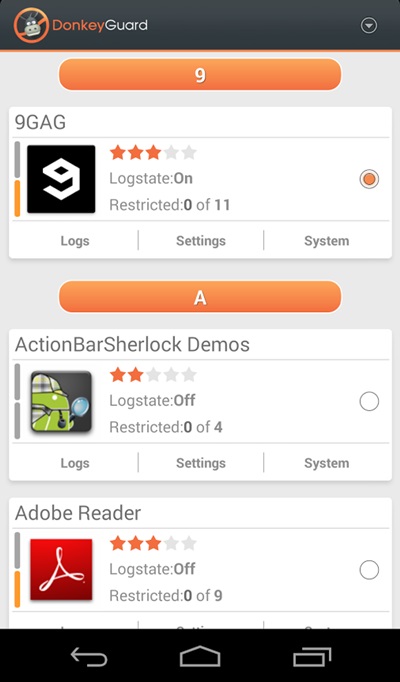
Step 5. Now launch the app and you will see all the apps that are currently installed on your device.
privacy 1
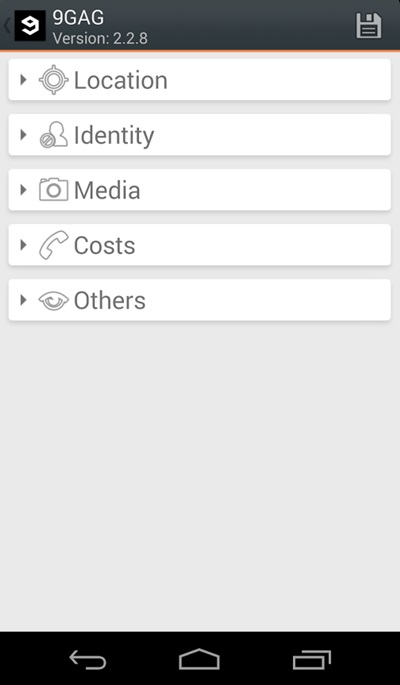
Step 6. Now edit the media permission for the apps that you don't want to have access to your media with private data.privacy 2
That's it, you are done! now the app will disallow the media access to that apps.

Manually Checking App Permission

Well, our Android operating system offers a nice feature in which we can manage a single app's permission. However, you need to have Android 6.0 Marshmallow or a newer version to get the option.
Step 1. First of all, open Settings and then tap on 'Apps'.
Manually Checking App Permission
Step 2. Now you will see the list of apps that are currently installed on your Android smartphone. Now you need to select the app, and then you will see 'Permissions.'
Manually Checking App Permission
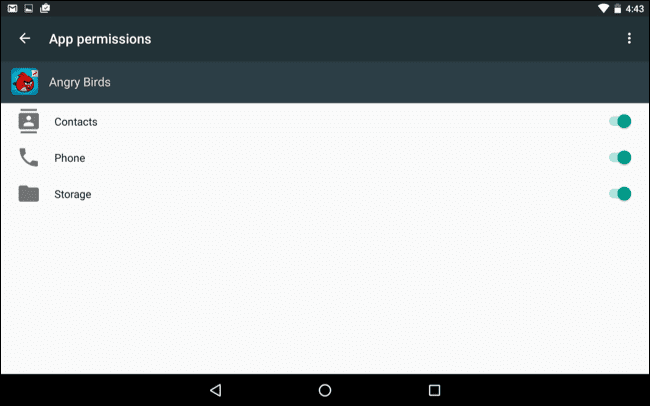
Step 3. Now it will open a new window, which will show you all permissions that you have granted to the app like Camera access, contacts, Location, microphone, etc. You can revoke any permissions as per your wish.
Manually Checking App Permission
Well, the same thing you need to perform if you feel that you have installed some suspicious app on your Android. By this way, you can protect your private data from Android apps.

Related news


Learn A-Z Kali_Linux Commands For Beginerrs

0 comments
Iemhacker-linux-command-for-beginner

All commands (A-Z) for Kali Linux here:
A
apropos Search Help manual pages (man -k)
apt-get Search for and install software packages (Debian/Ubuntu)
aptitude Search for and install software packages (Debian/Ubuntu)
aspell Spell Checker
awk Find and Replace text, database sort/validate/index
B
basename Strip directory and suffix from filenames
bash GNU Bourne-Again SHell
bc Arbitrary precision calculator language
bg Send to background
break Exit from a loop •
builtin Run a shell builtin
bzip2 Compress or decompress named file(s)
C
cal Display a calendar
case Conditionally perform a command
cat Concatenate and print (display) the content of files
cd Change Directory
cfdisk Partition table manipulator for Linux
chgrp Change group ownership
chmod Change access permissions
chown Change file owner and group
chroot Run a command with a different root directory
chkconfig System services (runlevel)
cksum Print CRC checksum and byte counts
clear Clear terminal screen
cmp Compare two files
comm Compare two sorted files line by line
command Run a command – ignoring shell functions •
continue Resume the next iteration of a loop •
cp Copy one or more files to another location
cron Daemon to execute scheduled commands
crontab Schedule a command to run at a later time
csplit Split a file into context-determined pieces
cut Divide a file into several parts
D
date Display or change the date & time
dc Desk Calculator
dd Convert and copy a file, write disk headers, boot records
ddrescue Data recovery tool
declare Declare variables and give them attributes •
df Display free disk space
diff Display the differences between two files
diff3 Show differences among three files
dig DNS lookup
dir Briefly list directory contents
dircolors Colour setup for `ls'
dirname Convert a full pathname to just a path
dirs Display list of remembered directories
dmesg Print kernel & driver messages
du Estimate file space usage
E
echo Display message on screen •
egrep Search file(s) for lines that match an extended expression
eject Eject removable media
enable Enable and disable builtin shell commands •
env Environment variables
ethtool Ethernet card settings
eval Evaluate several commands/arguments
exec Execute a command
exit Exit the shell
expect Automate arbitrary applications accessed over a terminal
expand Convert tabs to spaces
export Set an environment variable
expr Evaluate expressions
F
false Do nothing, unsuccessfully
fdformat Low-level format a floppy disk
fdisk Partition table manipulator for Linux
fg Send job to foreground
fgrep Search file(s) for lines that match a fixed string
file Determine file type
find Search for files that meet a desired criteria
fmt Reformat paragraph text
fold Wrap text to fit a specified width.
for Expand words, and execute commands
format Format disks or tapes
free Display memory usage
fsck File system consistency check and repair
ftp File Transfer Protocol
function Define Function Macros
fuser Identify/kill the process that is accessing a file
G
gawk Find and Replace text within file(s)
getopts Parse positional parameters
grep Search file(s) for lines that match a given pattern
groupadd Add a user security group
groupdel Delete a group
groupmod Modify a group
groups Print group names a user is in
gzip Compress or decompress named file(s)
H
hash Remember the full pathname of a name argument
head Output the first part of file(s)
help Display help for a built-in command •
history Command History
hostname Print or set system name
I
iconv Convert the character set of a file
id Print user and group id's
if Conditionally perform a command
ifconfig Configure a network interface
ifdown Stop a network interface
ifup Start a network interface up
import Capture an X server screen and save the image to file
install Copy files and set attributes
J
jobs List active jobs •
join Join lines on a common field
K
kill Stop a process from running
killall Kill processes by name
L
less Display output one screen at a time
let Perform arithmetic on shell variables •
ln Create a symbolic link to a file
local Create variables •
locate Find files
logname Print current login name
logout Exit a login shell •
look Display lines beginning with a given string
lpc Line printer control program
lpr Off line print
lprint Print a file
lprintd Abort a print job
lprintq List the print queue
lprm Remove jobs from the print queue
ls List information about file(s)
lsof List open files
M
make Recompile a group of programs
man Help manual
mkdir Create new folder(s)
mkfifo Make FIFOs (named pipes)
mkisofs Create an hybrid ISO9660/JOLIET/HFS filesystem
mknod Make block or character special files
more Display output one screen at a time
mount Mount a file system
mtools Manipulate MS-DOS files
mtr Network diagnostics (traceroute/ping)
mv Move or rename files or directories
mmv Mass Move and rename (files)
N
netstat Networking information
nice Set the priority of a command or job
nl Number lines and write files
nohup Run a command immune to hangups
notify-send Send desktop notifications
nslookup Query Internet name servers interactively
O
open Open a file in its default application
op Operator access
P
passwd Modify a user password
paste Merge lines of files
pathchk Check file name portability
ping Test a network connection
pkill Stop processes from running
popd Restore the previous value of the current directory
pr Prepare files for printing
printcap Printer capability database
printenv Print environment variables
printf Format and print data •
ps Process status
pushd Save and then change the current directory
pwd Print Working Directory
Q
quota Display disk usage and limits
quotacheck Scan a file system for disk usage
quotactl Set disk quotas
R
ram ram disk device
rcp Copy files between two machines
read Read a line from standard input •
readarray Read from stdin into an array variable •
readonly Mark variables/functions as readonly
reboot Reboot the system
rename Rename files
renice Alter priority of running processes
remsync Synchronize remote files via email
return Exit a shell function
rev Reverse lines of a file
rm Remove files
rmdir Remove folder(s)
rsync Remote file copy (Synchronize file trees)
S
screen Multiplex terminal, run remote shells via ssh
scp Secure copy (remote file copy)
sdiff Merge two files interactively
sed Stream Editor
select Accept keyboard input
seq Print numeric sequences
set Manipulate shell variables and functions
sftp Secure File Transfer Program
shift Shift positional parameters
shopt Shell Options
shutdown Shutdown or restart linux
sleep Delay for a specified time
slocate Find files
sort Sort text files
source Run commands from a file `.'
split Split a file into fixed-size pieces
ssh Secure Shell client (remote login program)
strace Trace system calls and signals
su Substitute user identity
sudo Execute a command as another user
sum Print a checksum for a file
suspend Suspend execution of this shell •
symlink Make a new name for a file
sync Synchronize data on disk with memory
T
tail Output the last part of file
tar Tape ARchiver
tee Redirect output to multiple files
test Evaluate a conditional expression
time Measure Program running time
times User and system times
touch Change file timestamps
top List processes running on the system
traceroute Trace Route to Host
trap Run a command when a signal is set(bourne)
tr Translate, squeeze, and/or delete characters
true Do nothing, successfully
tsort Topological sort
tty Print filename of terminal on stdin
type Describe a command •
U
ulimit Limit user resources •
umask Users file creation mask
umount Unmount a device
unalias Remove an alias •
uname Print system information
unexpand Convert spaces to tabs
uniq Uniquify files
units Convert units from one scale to another
unset Remove variable or function names
unshar Unpack shell archive scripts
until Execute commands (until error)
uptime Show uptime
useradd Create new user account
userdel Delete a user account
usermod Modify user account
users List users currently logged in
uuencode Encode a binary file
uudecode Decode a file created by uuencode
V
v Verbosely list directory contents (`ls -l -b')
vdir Verbosely list directory contents (`ls -l -b')
vi Text Editor
vmstat Report virtual memory statistics
W
wait Wait for a process to complete •
watch Execute/display a program periodically
wc Print byte, word, and line counts
whereis Search the user's $path, man pages and source files for a program
which Search the user's $path for a program file
while Execute commands
who Print all usernames currently logged in
whoami Print the current user id and name (`id -un')
wget Retrieve web pages or files via HTTP, HTTPS or FTP
write Send a message to another user
X
xargs Execute utility, passing constructed argument list(s)
xdg-open Open a file or URL in the user's preferred application.
yes Print a string until interrupted
. Run a command script in the current shell
!! Run the last command again

Related articles


  1. Pentest Magazine
  2. Pentest Iso
  3. Pentest
  4. Hacking Google
  5. Pentest Book
  6. Is Hacking Illegal
  7. Hacker Wifi Password
  8. Pentest Plus

Country

free counters
 

ဦးဘုန္း (ဓာတု) မႏၱေလး. Copyright 2011 All Rights Reserved Free Wordpress Templates by Brian Gardner Blogger Templates presents HD TV Fringe Streaming. Featured on Wedding Photographers Singapore.